


While perusing LinkedIn a few days ago, I came across a post from Benedict Evans.
It piqued my interest, partly because I do not always agree with him, but also because this one hit on something I have been thinking about for a while.
His point was simple: a GUI is not just a list of functions. It is an expression of the distillation of years of institutional learning into “this is what matters now.” Replace it with a blank prompt, and you risk forcing people to rebuild that whole thing again from scratch.

That got me thinking about how this plays out in the large enterprise, and how UI has already evolved through two massive shifts, with a third one now underway.
So, I wrote my LinkedIn post, and another one on X that got much more traction (by the way, feel free to connect and engage with me on those platforms as well, I always enjoy interacting!)
I am going to expand on it in today’s newsletter.
The third great shift
In the 1980s and 90s, enterprise software was unapologetically hostile.
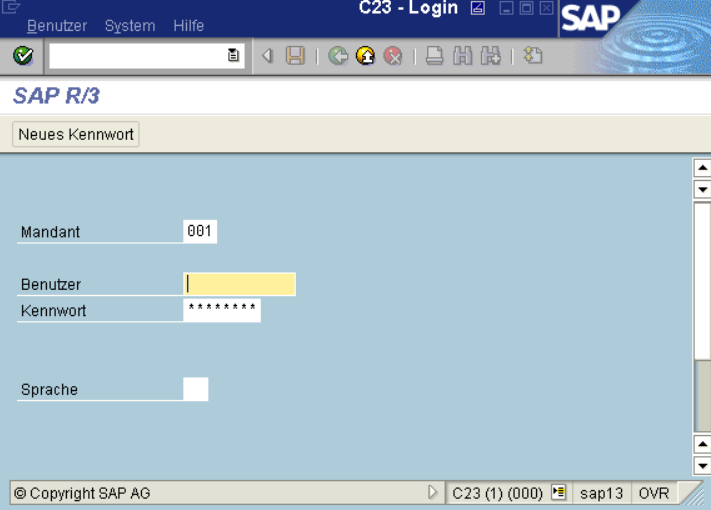
If you worked in a large bank or insurer running SAP R/3, Oracle Financials, or PeopleSoft, you were staring at a wall of transaction codes and cryptic fields. A simple purchase order required weeks of vendor-led training.
I am not that old, but I was nevertheless (un)lucky enough to start my career in that world, dealing with SAP R/3 in the late 2000s. The logic was simple: the system enforced the process, not the other way around. You adapted to the machine.
Then came the SaaS wave: Salesforce, Workday, ServiceNow, Atlassian, etc
The pitch was “no training needed”. Tabs, dashboards, drag-and-drop meant that a sales rep could log an opportunity without touching a manual. It was a smart distribution strategy, because a friendlier UI meant more people could use the tool without IT intervention, which meant faster seat growth, which meant faster revenue growth.
Now, we are entering the third shift. And it is the most consequential one yet.
In the AI era, the primary “user” of enterprise systems is no longer the human but the agent.
When ServiceNow deploys an AI that can resolve 70% of IT tickets without a technician, or Coupa approves a purchase order without procurement touching it, the human is no longer the driver, but becomes the reviewer, the exception handler, the final arbiter.
That changes everything about how UI should be designed.
🚨 Get my book Beyond Slides: Stand out, become irreplaceable, and win big in consulting

If you want to develop the part of your consulting toolkit that no AI or template can replace (eg, the ability to influence decisions, win trust in the room, and navigate complex situations) Beyond Slides was written for you.
A #1 Amazon Best Seller in the Consulting category in USA, UK, Australia, and Italy, Beyond Slides is out in e-book and paperback format on Amazon (also available as an audiobook in the USA) and whatever you buy books.
Thank you for your support.
For 40 years, enterprise UI design has been about guiding humans through processes, however now it must be about arbitrating between human and machine.
That means, in my view, at least three big changes:
From guidance to arbitration
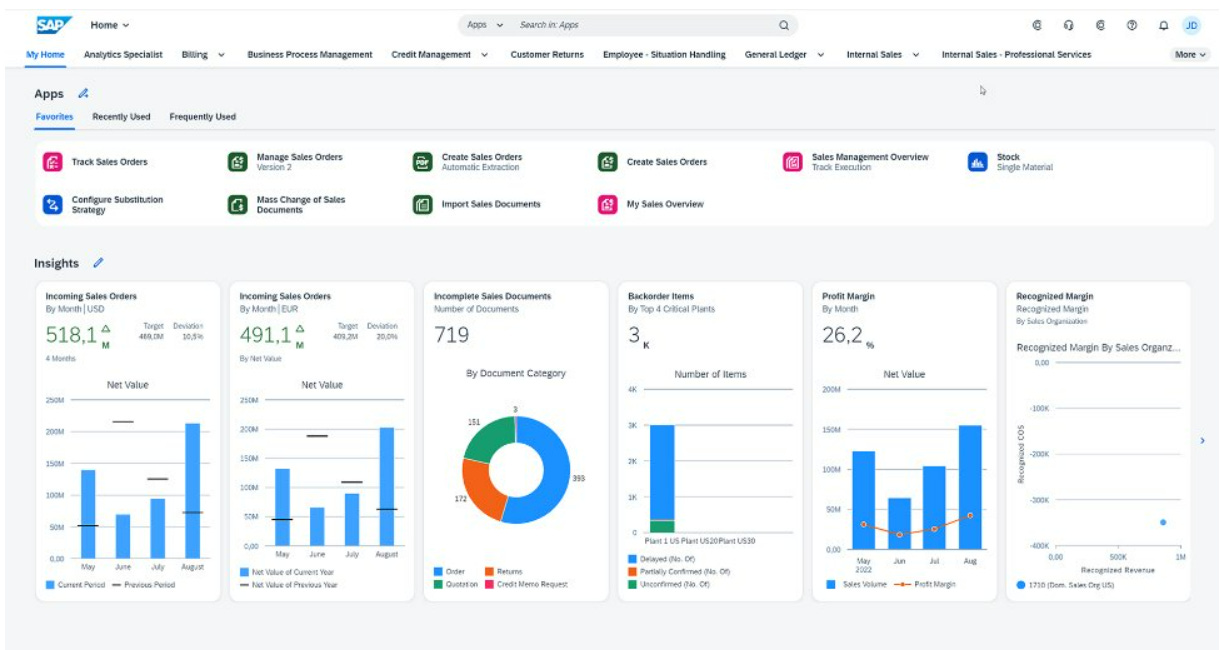
SAP Fiori was designed to guide a human through a process step-by-step. The next SAP UI will need to explain why an agent made a decision, show its reasoning, list alternatives, and let you reverse it without breaking downstream workflows.From efficiency to trust
In the SaaS era, you sold “fewer clicks.” In the AI era, you sell “provable correctness.” The winning UI will let a CFO trace an agent’s decision down to the transaction level in NetSuite, or a compliance officer see the entire logic chain behind an “approve” recommendation in Workday.From static workflows to fluid handovers
In today’s Salesforce, you either follow the opportunity workflow or you don’t. In the next Salesforce, you will fluidly jump between a deterministic stage (fully automated) and a free-form agent conversation, all in the same pane, without losing context or auditability.
A lot of people imagine AI will unify all enterprise work into a single conversational layer. The opposite is more likely.
A suggested checklist for consultants and advisors
Each major system (ERP, CRM, HRIS, ITSM) will want to own its own arbitration and explanation layer to protect lock-in. This means an employee could end up toggling between half a dozen explainability styles across systems. Inconsistency here is very annoying, plus it will lead to operational errors and compliance gaps.
History shows that vendors who rebuild their UI logic from scratch for a new paradigm (I dislike the word, but here we are…) win the transition. For example, Oracle’s green screens of the 1990s gave way to web-based ERP through PeopleSoft and NetSuite; Microsoft moved from the ribbon in Office to Teams as a central work hub; ServiceNow went from ticket forms to visual workflow canvases (thanks Bill).
The ones who just wrapped the old UI in a new frame (eg, Siebel with “web” Siebel, HP with its ITSM tools) kind of fell off a cliff.
In this third shift, the stakes are higher because the system is no longer a static repository of business rules, but more akin to an autonomous actor making decisions.
If you cannot design a UI where a human can interrogate, approve, and overrule an AI without breaking the system, you will be replaced by a competitor who can.
So, I believe that the next decade of enterprise software will be defined by how well your UI shows its work, more than how fast your AI runs.
If you are advising a client or assessing a vendor, ask these five questions. If the answer is vague, they are not ready for the third shift.
Can the UI explain any AI decision in plain language?
Not just “the outcome” but also the reasoning, the data used, the alternatives considered.Is there a built-in audit trail for AI actions?
Can you reconstruct the exact system state (datasets, model version, parameters) at the moment a decision was made?How fluidly does the UI handle human handovers?
Can a user jump from automated execution to manual intervention without losing context or breaking downstream workflows?Are hierarchical transparency layers in place?
Can different roles (eg, operator, manager, compliance, regulator) see the right level of detail without creating risk or information overload?Was the UI rebuilt for the AI era or just “chat-wrapped”?
Ask to see how the interface was re-architected for arbitration, trust, and explainability (most will have just a “conversational skin”).
The vendors that pass this test will have prettier software AND the foundations for trust, adoption, plus staying power in the AI era. The ones that fail will find their “intelligent” features gathering dust, bypassed by humans who do not understand or trust them.
In every past UI shift, the market has been brutal to laggards. This one will be faster, because AI compounds both capability and risk at unprecedented speed.
What do you think? Let me know in the comments…
👋
👀 Links of interest
A few corners of the internet you may find interesting:
The Leaders Toolkit is a deck of 52 tools, frameworks and mental models to make you a better leader (use code CONSULTANT10 for 10% off);
The Consulting Intel private Discord group with 230+ global members is where consultants meet to discuss and support each other (it’s free).
65 thoughts from Seth Godin, including bangers like Earn trust through action, Attitudes are skills, Not all criticism is equally valid, and my personal favorite When in doubt look for the fear
This is really insightful and interesting - thanks Maurizio
Good point.
Have you seen any good examples of this yet?